
Start with your actual trip
Neither option is automatically better for everyone.
eSIM is usually lighter and more independent. Pocket WiFi is often easier to share. The right starting point depends on your phone, group, devices, and whether travelers will stay together.
Use the quick answer first, then check cost, coverage, setup, and current plan conditions before buying.
3-second answer
Which option should you start with?
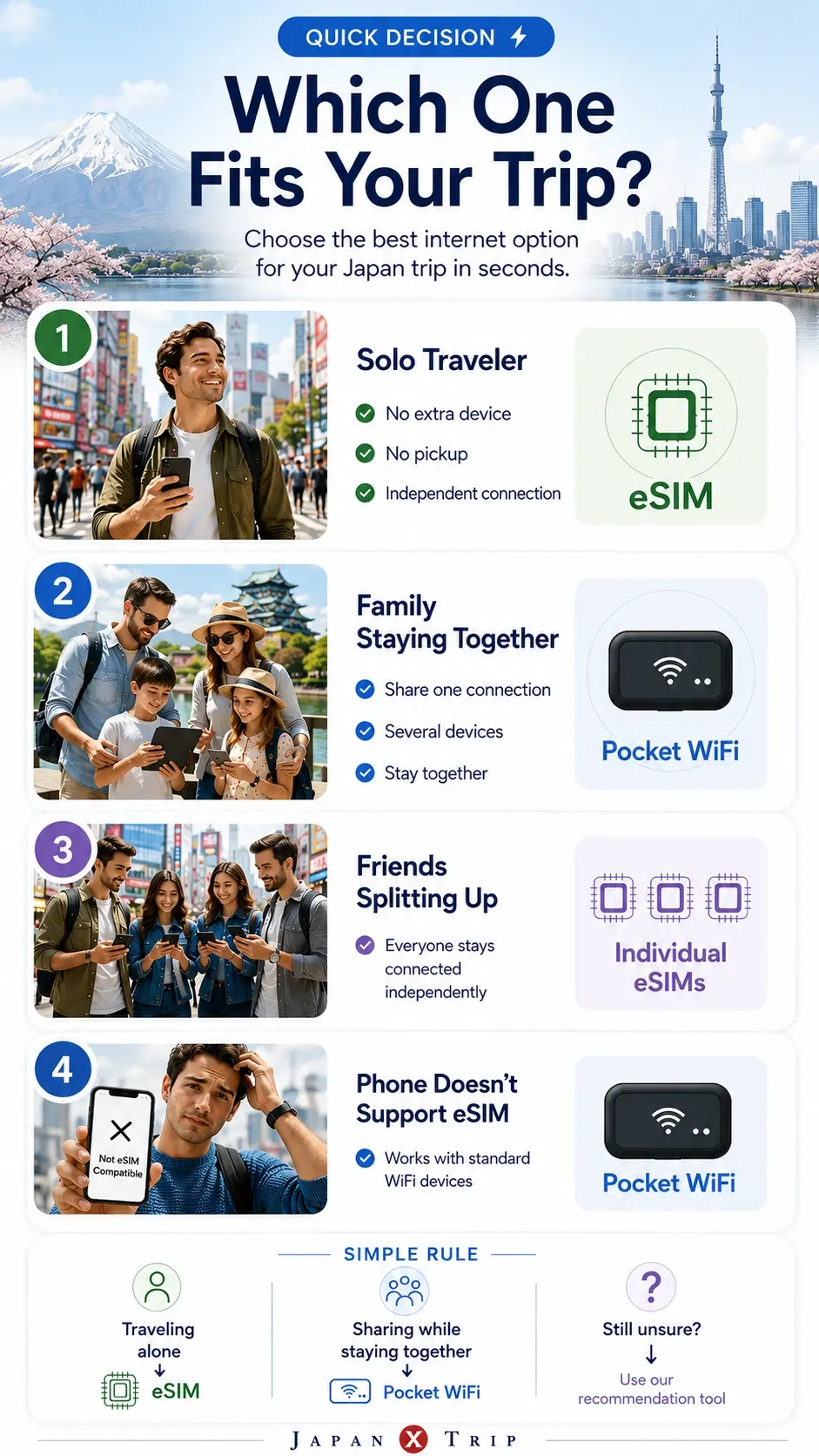
Start with an eSIM for an independent connection. Start with Pocket WiFi when several nearby devices will share one router.
Start with an eSIM
Your phone is compatible and you want your own connection.
- No pickup, return, or extra router.
- Better when travelers may separate.
- Requires an unlocked eSIM-compatible phone.
Start with Pocket WiFi
Your group stays together and several devices need internet.
- Phones, tablets, and laptops can share one connection.
- Useful when a phone cannot use eSIM.
- The router must be carried, charged, and returned.
Need a trip-specific answer?
Check your phone, group, devices, and travel pattern.
At-a-glance comparison
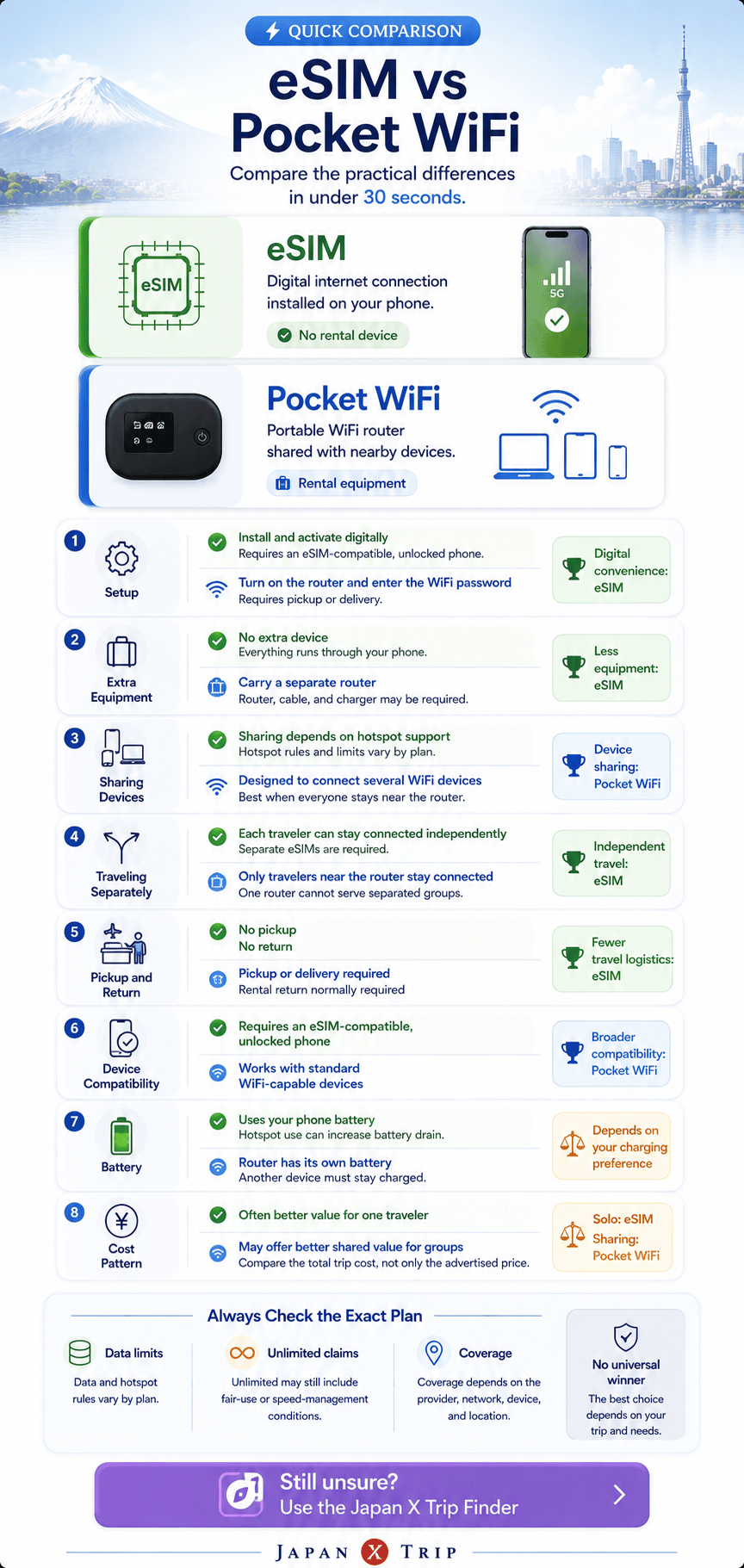
The main difference is independent vs shared access.
Use the visual summary first. Open the table when you need to check a specific practical difference.
eSIM
Independent connection, no extra router
Best suited to compatible phones and travelers who may separate.
Pocket WiFi
One shared connection for nearby devices
Best suited to groups staying together with several devices.
| Feature | eSIM | Pocket WiFi |
|---|---|---|
| Physical device | No extra device beyond a compatible phone | A separate rental router is required |
| Setup | Install and activate on the phone | Power on and connect by WiFi password |
| Compatibility | Requires an unlocked, eSIM-compatible phone | Works with WiFi-capable phones, tablets, and laptops |
| Multiple devices | Depends on hotspot support or separate plans | Usually designed for shared connections |
| Group separation | Easy when each traveler has an individual plan | Difficult because the router stays with one group |
| Pickup and return | Not required | Usually required, depending on the rental service |
| Charging | Phone only, subject to normal battery use | Router battery plus the connected devices |
| Loss or damage | No rental hardware risk | Rental loss or damage charges may apply |
| Data limits | Plan-specific, including hotspot and fair-use terms | Rental-plan-specific, including fair-use terms |
| Coverage | Depends on the selected network, plan, location, and device | Depends on the selected network, plan, and location |
| Best starting fit | Solo or independent travelers with compatible phones | Groups staying together or travelers using many devices |
The digital option
What is an eSIM?
An eSIM is a digital SIM profile installed on an unlocked, compatible phone. It removes the need for pickup, return, or a physical SIM swap. Installation, activation timing, data limits, and hotspot support still depend on the selected plan.
The shared-router option
What is Pocket WiFi?
Pocket WiFi is a portable rental router that shares one internet connection with nearby phones, tablets, and laptops. It works without eSIM support, but the router must be collected or delivered, carried, charged, and usually returned.
Nine decision factors
The right choice depends on how the trip actually works.
Use these questions before comparing providers or headline prices. Each row includes the practical point even when it stays closed.
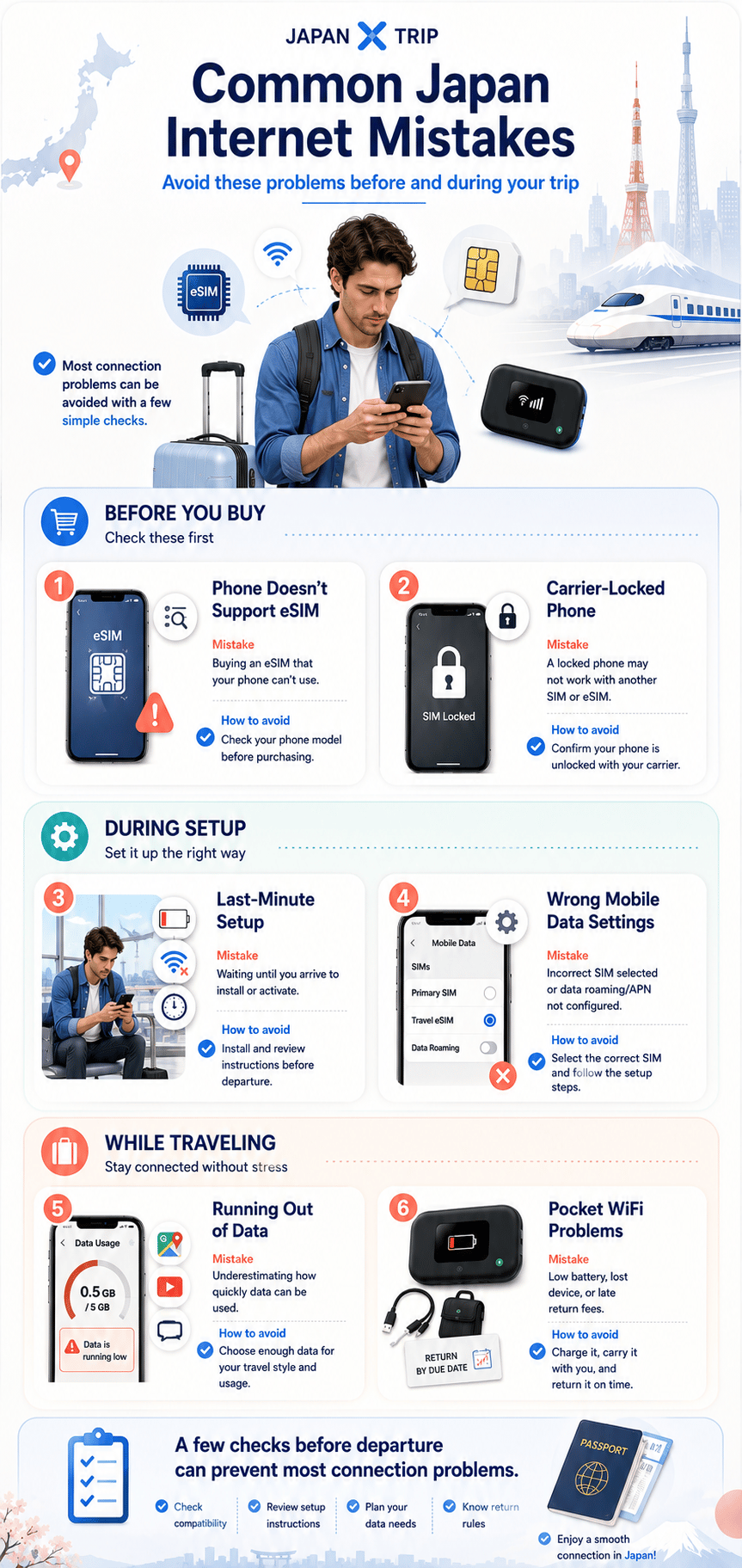
1. Is your phone unlocked and eSIM-compatible?This is the first gate for using an eSIM.
Confirm both carrier-unlocked status and support for the exact phone model. A phone can be modern but still lack eSIM support in a particular market or carrier configuration.
2. Are you traveling alone or with other people?Solo travelers often value independent digital setup.
A group may benefit from sharing, but group size alone does not decide the answer. Consider whether every traveler needs an independent connection.
3. Will the group stay together?One shared router only helps people who remain near it.
When travelers separate for shopping, transport, or different activities, individual eSIMs or a mixed setup can reduce coordination risk.
4. How many devices need internet?Count phones, tablets, laptops, and other WiFi devices.
Pocket WiFi is designed for sharing, while eSIM sharing depends on the plan's hotspot rules and the phone's capabilities. Device limits vary by product.
5. How much setup effort do you want?Digital installation and physical pickup create different work.
An eSIM avoids collection and return but requires confidence with phone settings. Pocket WiFi can be familiar after pickup, yet adds logistics and another device to manage.
6. How much data will you use?Do not compare only the word “unlimited.”
Check fair-use policies, speed management, daily allowances, tethering limits, and whether video calls, uploads, or streaming are central to the trip.
7. How long is the trip?Validity and rental duration can change the total value.
Compare the full trip period, extension rules, top-up options, and any delivery, return, insurance, or extra-day charges.
8. Will you carry and charge another device?Pocket WiFi adds a router, cable, battery, and return obligation.
An eSIM removes the rental device, although hotspot use can increase phone battery consumption. Choose the operating burden you are more comfortable managing.
9. What happens if something goes wrong?Support and recovery matter as much as the initial setup.
Review support hours, setup guides, replacement or troubleshooting processes, offline instructions, cancellation terms, and whether a backup connection is sensible.
Best choice by traveler type
Find the case closest to your trip.
Use these as starting points. Your device and current plan terms still decide the final choice.
Solo traveler
Start with an eSIM
No pickup, return, or extra router when your phone is compatible.
Check: Unlocked status, validity, data allowance, and hotspot support.
Couple staying together
Compare both options
One router can simplify sharing; separate eSIMs preserve independence.
Check: Total cost and whether you may separate during the day.
Family with several devices
Start by comparing Pocket WiFi
One router can connect several nearby phones, tablets, or laptops.
Check: Device limits, battery, fair-use rules, pickup, and return.
Group that may split up
Start with separate eSIMs or a mixed setup
One router cannot stay with multiple groups at the same time.
Check: Phone compatibility and the cost of independent plans.
See three additional travel situations
Locked or incompatible phone
Start with Pocket WiFi
WiFi-capable devices can connect without installing an eSIM.
Check: Rental logistics, device charging, and support.
Remote worker or laptop-heavy traveler
Compare Pocket WiFi with hotspot-enabled eSIM
The better fit depends on device count, tethering, battery, and backup needs.
Check: Hotspot permission, fair-use limits, and charging.
Simplest arrival setup
Choose the process you can prepare confidently
A preinstalled eSIM or prearranged pickup can both be simple.
Check: Activation timing, pickup hours, return steps, and offline instructions.
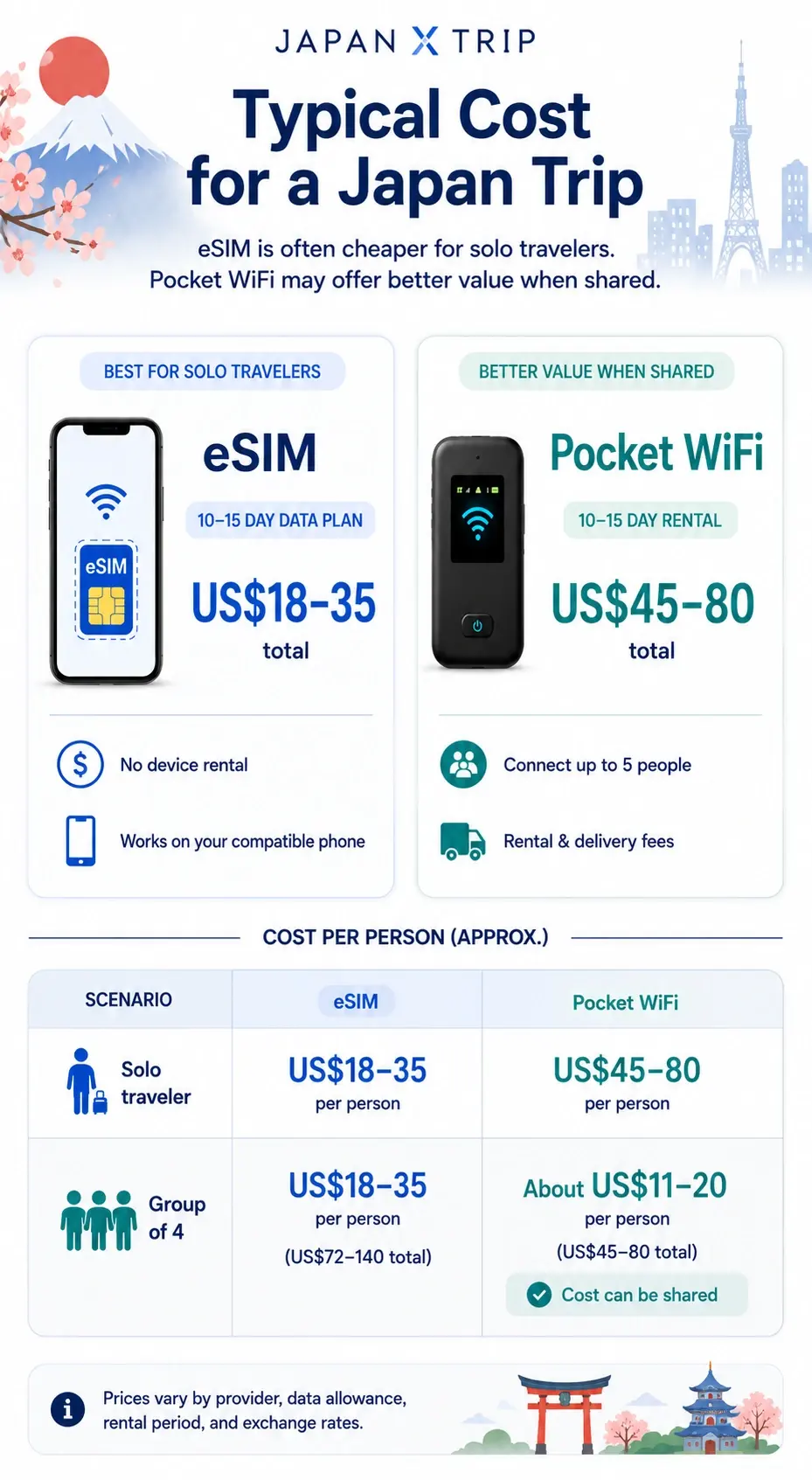
Cost comparison
Compare the total trip cost, not the headline price.
A cheaper-looking plan can become less competitive after delivery, insurance, extensions, device sharing, or payment effects are included.
Total trip cost
Plan or rental price + pickup or delivery fees + optional insurance + extension fees + possible extra-device costs + currency or payment effects
For an eSIM, verify
- Data amount and validity period
- Top-up rules and expiry
- Hotspot or tethering permission
- Activation timing and refund conditions
For Pocket WiFi, verify
- Rental duration and extension fees
- Pickup, delivery, and return method
- Insurance and loss or damage terms
- Fair-use limits and device capacity
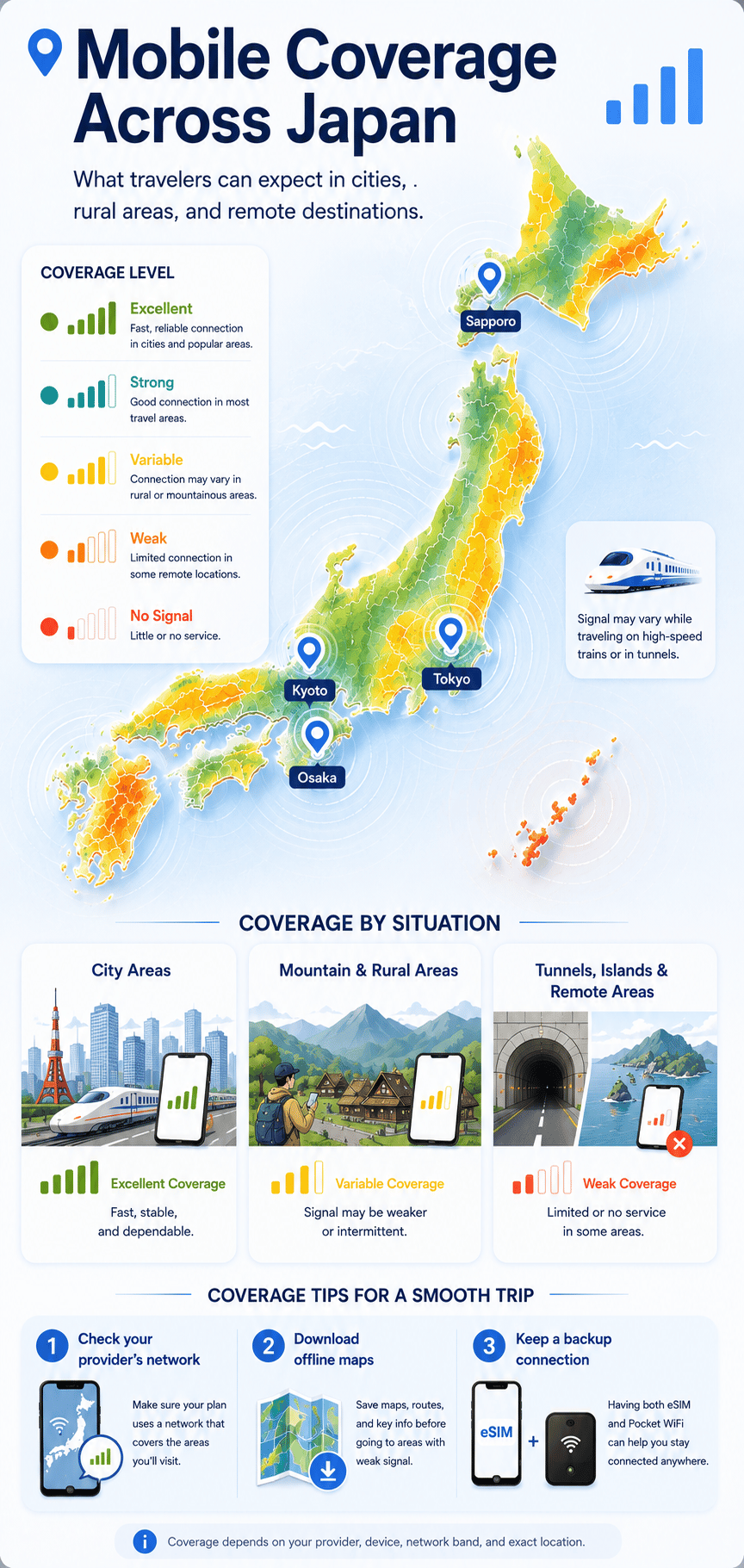
Coverage in Japan
The network and plan matter more than the format.
eSIM and Pocket WiFi are delivery formats. The underlying Japanese network, selected plan, location, terrain, congestion, building environment, and device support determine coverage more directly.
Major cities and tourist areas
Coverage is generally broad, but congestion and indoor conditions can still affect performance.
Rural and mountain areas
Terrain, the underlying network, and local infrastructure matter more than the connection format alone.
Remote islands
Coverage may vary significantly, so check the selected plan's network and destination support.
Tunnels and high-speed travel
Temporary interruptions can occur on trains, in tunnels, and while moving quickly between cells.
Buildings and crowded locations
Walls, basements, congestion, and device radio support can reduce speed or signal quality.
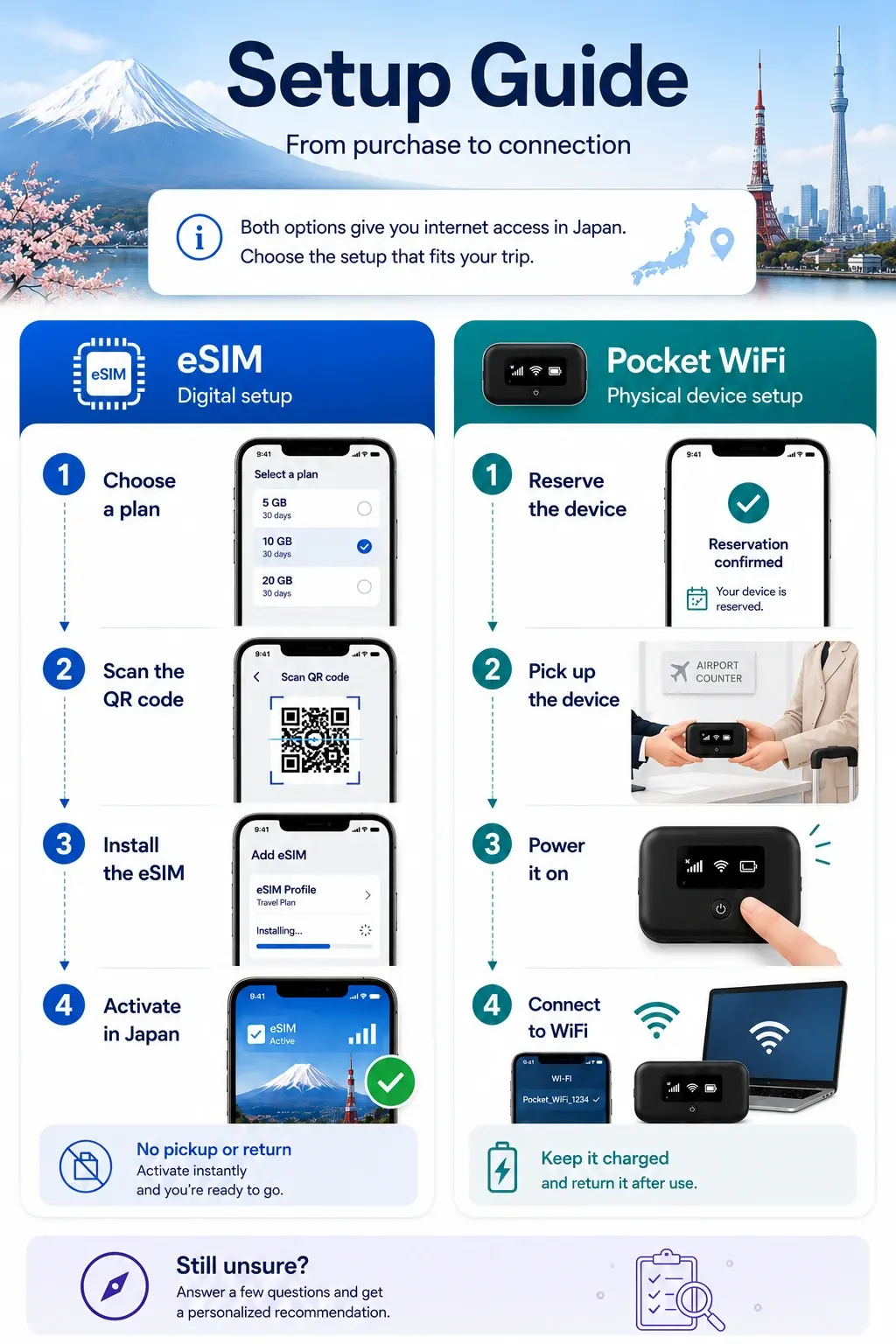
Setup comparison
Choose the workflow you can complete confidently.
eSIM removes physical pickup and return, but requires correct phone settings. Pocket WiFi uses familiar WiFi credentials, but adds collection, charging, and return steps.
eSIM setup flow
- 1Confirm that the phone supports eSIM.
- 2Confirm that the phone is carrier-unlocked.
- 3Purchase the correct plan for the trip.
- 4Install before travel when the provider recommends it.
- 5Label the new line clearly in phone settings.
- 6Configure mobile data, data switching, and roaming correctly.
- 7Activate or test at the correct time for that plan.
Pocket WiFi setup flow
- 1Reserve the rental for the correct dates.
- 2Confirm delivery or airport pickup details.
- 3Collect the router and included accessories.
- 4Power it on and confirm the network indicator.
- 5Connect each device using the WiFi credentials.
- 6Monitor battery level and the provider's data policy.
- 7Return it by the required deadline and method.
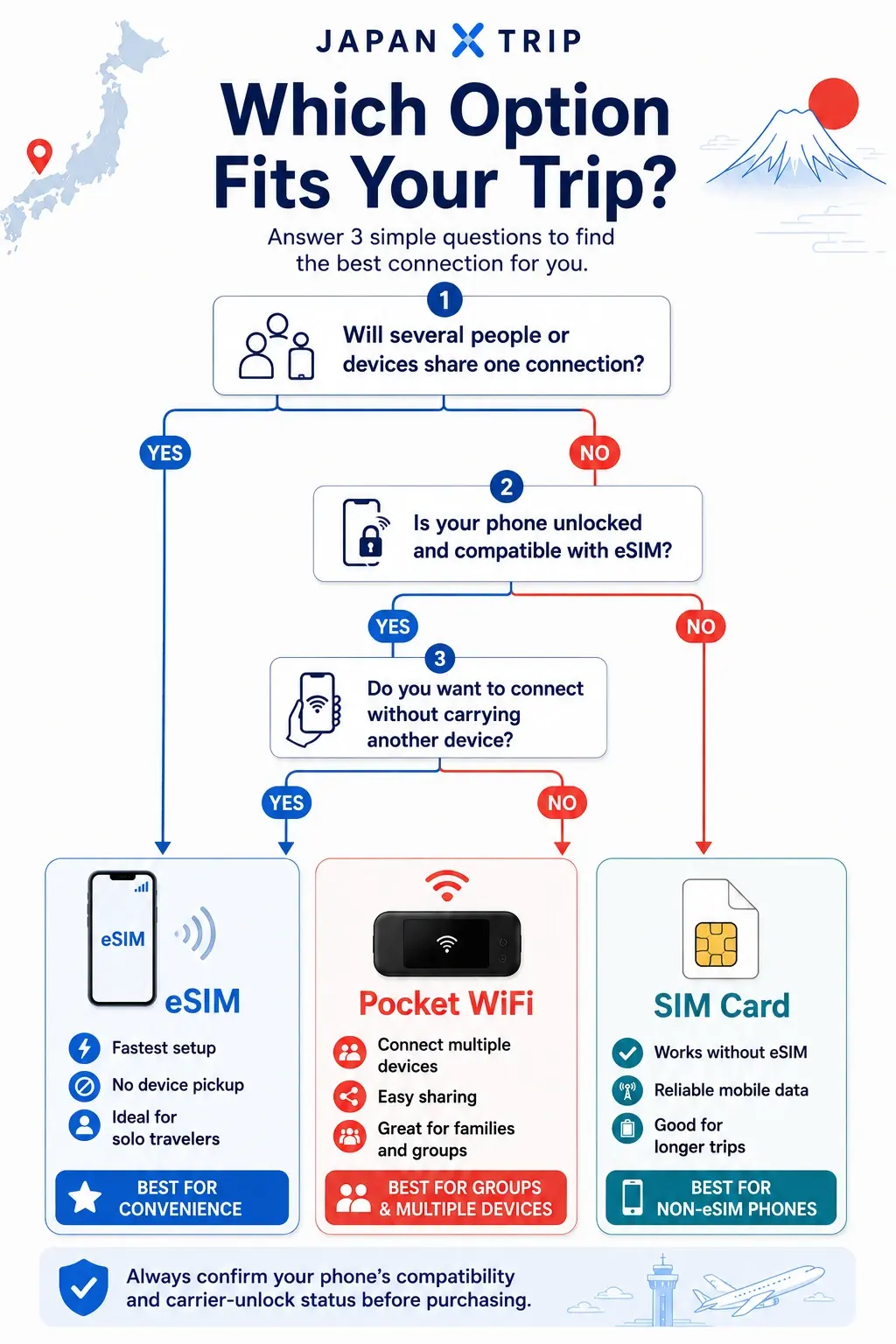
Quick decision guide
Which Option Fits Your Trip?
Answer these quick questions to see whether an eSIM or Pocket WiFi is likely to suit your trip before comparing individual plans.
Will several people or devices share one connection?
YesPocket WiFi may be the better fit for a family, group, or several devices traveling together.
NoContinue to question 2 to check whether an eSIM suits your phone.
Is your phone unlocked and compatible with eSIM?
YesContinue to question 3 to compare convenience with a separate WiFi device.
NoPocket WiFi may be the safer starting point because it does not require eSIM support.
Do you want to connect without carrying another device?
YesAn eSIM is likely to suit you better if your phone is compatible.
NoPocket WiFi may suit you better if you prefer one shared connection for nearby devices.
Need a more personal answer?
Get a recommendation based on your actual trip.
Trip length, group size, phone compatibility, data use, and hotspot needs can all affect the best option.
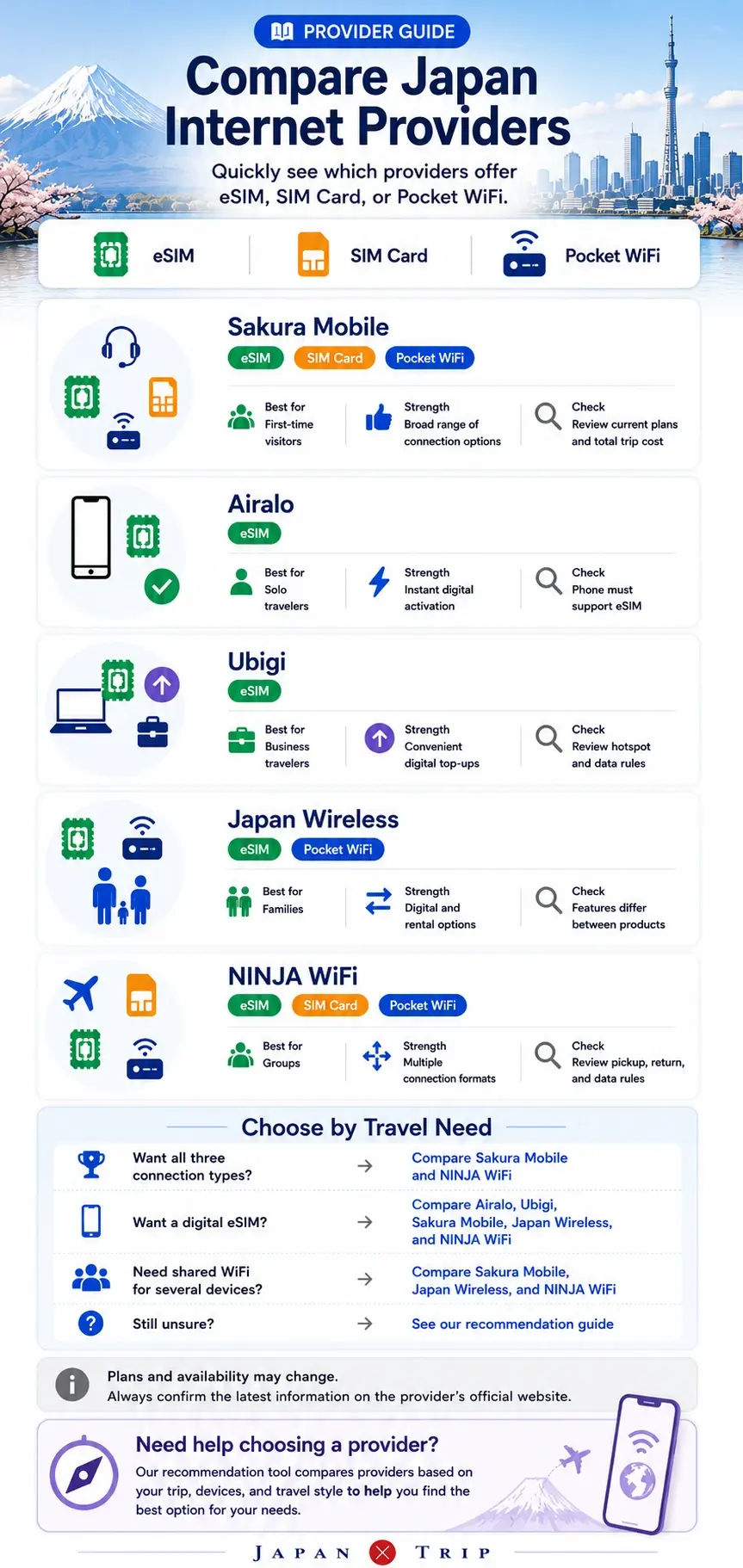
Provider starting points
Choose the format first, then compare providers.
Review current plans only after deciding whether your trip fits an eSIM, Pocket WiFi, or both.
Approved starting points
Compare only the providers that match your chosen format.
eSIM + Pocket Wi-Fi
Sakura Mobile
Travelers who value Japan-focused information and English-language guidance.
- Several connection types
- Japan-focused support
Verify: Compare the exact product because setup, pickup, validity, and pricing differ.
Affiliate link
eSIM
Ubigi
Travelers comparing alternative prepaid eSIM plans for Japan.
- Digital setup
- No rental device
Verify: Check current plan validity, supported networks, and installation instructions.
Affiliate link
Pocket Wi-Fi + eSIM
Japan Wireless
Groups who want a shareable Pocket WiFi router, and solo travelers who prefer a fully digital eSIM setup.
- Pocket Wi-Fi and eSIM options from one provider
- Useful for device sharing or a fully digital setup
Verify: Confirm current pricing, data conditions, and pickup or activation details for the selected product on the official site.
Affiliate link
Pocket Wi-Fi + eSIM
NINJA WiFi
Travelers who prefer a rental router and airport-oriented collection.
- Multiple-device connection
- No phone SIM replacement
Verify: Confirm pickup location, opening hours, return rules, and additional rental charges.
Affiliate link
Pros and cons
A final side-by-side recap.
Treat these as format-level tendencies. Exact performance and value still depend on the selected provider and plan.
eSIM pros
- No rental device to collect, carry, or return.
- Can often be installed before departure.
- Each traveler can keep an independent connection.
- Useful when the group may separate during the day.
eSIM limitations
- Requires a compatible, carrier-unlocked phone.
- Installation and activation rules vary by plan.
- Hotspot use may be restricted or unavailable.
- Each traveler may need a separate plan.
Pocket WiFi pros
- Several WiFi-capable devices can share one router.
- Works even when a phone does not support eSIM.
- Can be convenient for families staying together.
- Familiar WiFi-password setup for phones and laptops.
Pocket WiFi limitations
- The router must be carried and charged.
- One device cannot serve travelers who split up.
- Pickup, delivery, and return logistics may apply.
- Loss, damage, and fair-use conditions must be checked.
Frequently asked questions
eSIM vs Pocket WiFi for Japan FAQ
Is eSIM or Pocket WiFi better for Japan?
An eSIM is usually the simpler starting point for a traveler with an unlocked compatible phone who wants an independent connection. Pocket WiFi may be a better starting point when several devices will share one connection and the group will stay together.
Do I need Pocket WiFi in Japan?
Not necessarily. Many travelers can use an eSIM or physical SIM instead. Pocket WiFi becomes more useful when a phone cannot use eSIM, several devices need one connection, or a family prefers a shared router.
Is an eSIM enough for Japan travel?
It can be enough when the phone is unlocked and compatible, the plan has suitable data and validity, and any hotspot needs are supported. Coverage and speed depend on the provider, underlying network, location, device, and plan conditions.
Is Pocket WiFi better for a family?
It can be a practical starting point for a family that stays together and connects several phones, tablets, or laptops. Separate eSIMs may be more practical when family members may split up.
Can I use an eSIM with a locked phone?
Usually no. Travel eSIMs generally require a carrier-unlocked phone that supports eSIM. Confirm the exact device model and carrier-lock status before purchasing.
Can I connect a laptop through an eSIM?
Possibly, by using phone hotspot or tethering. The phone and plan must both support it, and data or speed limits may apply. Check the exact plan terms before relying on it for remote work.
Does Pocket WiFi work in rural Japan?
It may work, but the router format alone does not guarantee stronger rural coverage. Performance depends on the underlying network, location, terrain, congestion, device, and rental plan.
Is unlimited Pocket WiFi really unlimited?
Not always in the everyday sense. Unlimited plans may still include fair-use rules, speed management, daily thresholds, or congestion controls. Read the exact conditions for the selected rental.
Do I need to return Pocket WiFi?
Rental Pocket WiFi usually must be returned by the provider's specified method and deadline. Check the return location, packaging, late fees, and loss or damage terms before booking.
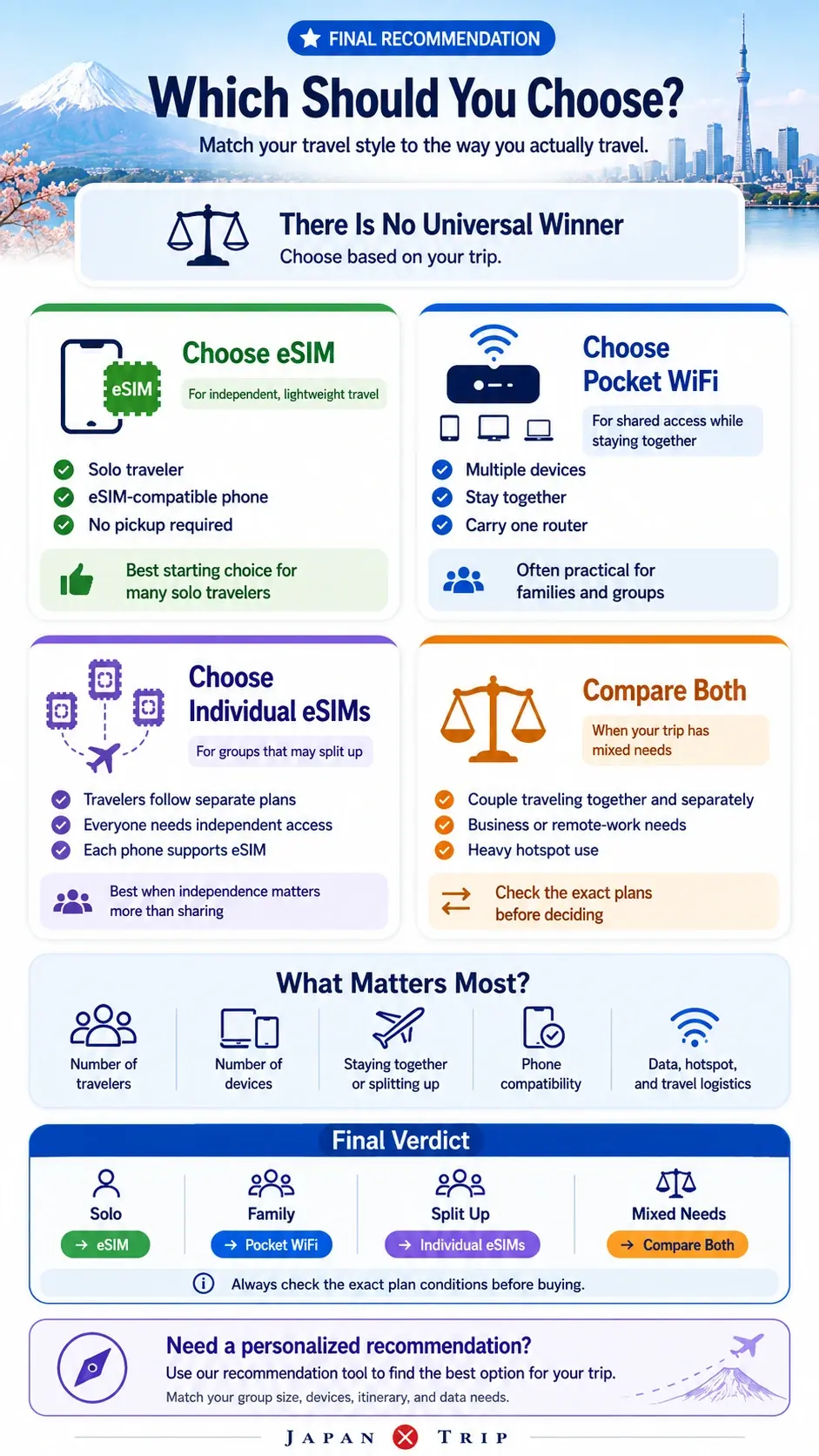
Final recommendation
Choose the setup that matches how your trip moves.
Choose an eSIM when
You need an independent connection without another device.
Best when your phone is unlocked and compatible, and travelers may separate during the trip.
Choose Pocket WiFi when
Several nearby devices will share one connection.
Best when the group stays together or a phone cannot use eSIM.
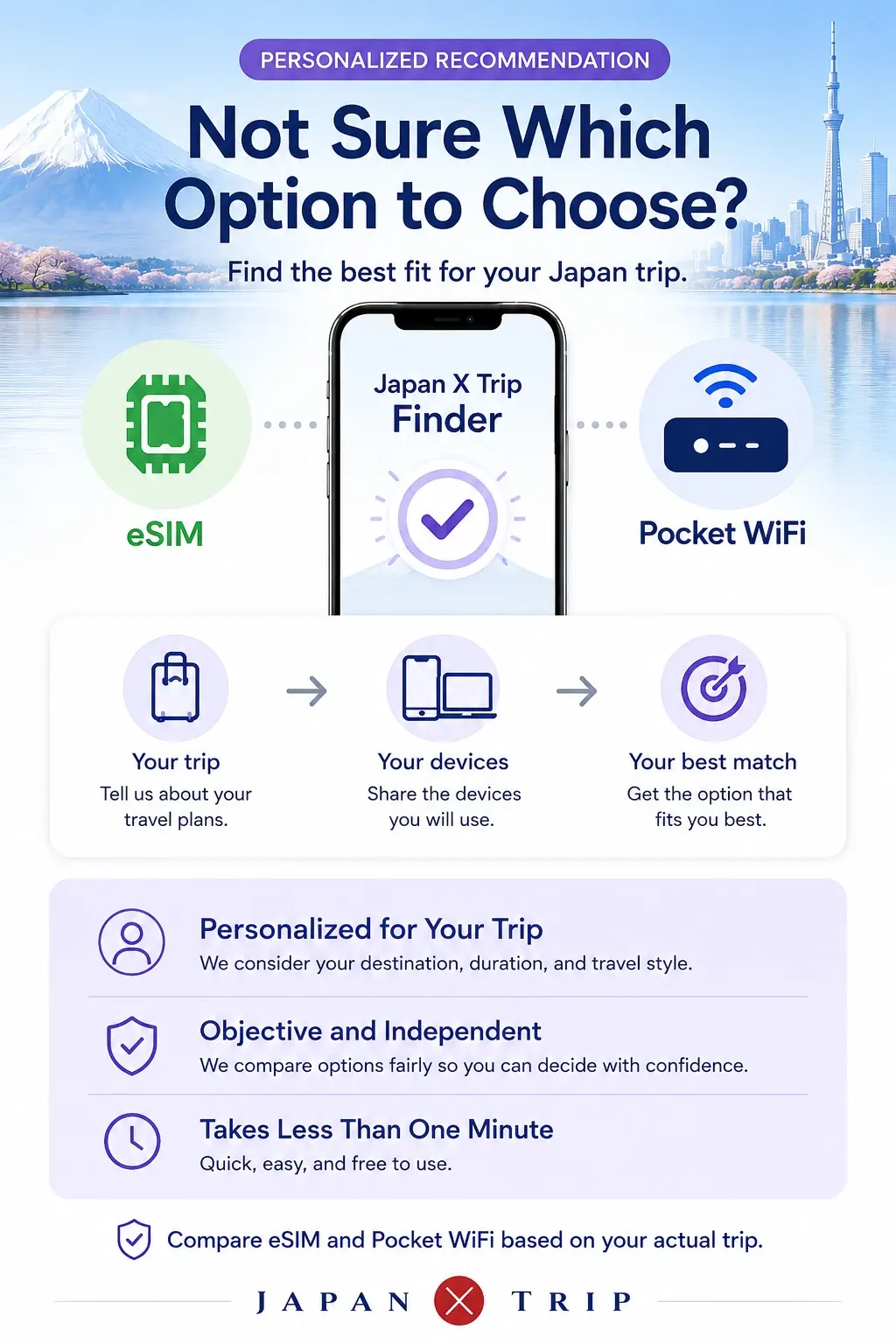
Your next step
Get a recommendation for your actual trip.
Answer a few questions about your phone, group, devices, trip length, and data use.